kmcg2375

This user hasn't shared any biographical information
Jabber/GTalk: kellimcgraw
Slaves to the Grade
It’s that time of year. Teachers of Year 12 around Australia are scrambling to varying degrees to prepare students for final assessments and exams, which inevitably involves a whole lotta marking.
Of course, all teachers have to grade student work. And they are engaged in doing this all year. But nothing beats the pedal-to-the-metal feeling of marking Year 12 practice tasks in a last ditch effort to refine their examination responses.
In particular, nothing beats the hellish pressure that exists in states like NSW and Victoria where the HSC and VCE exams respectively loom over teachers and students alike. And out of all these teachers and students, I argue that subjects that are writing-intensive (e.g. English and History) have it the toughest; if you have a class of 25 for Year 12 and it’s coming up to an assessment, teachers in these subjects are spending their nights and weekends correcting pages and pages and pages of long form expositions.
Which can leave your eyes (and soul) feeling kinda like this:

I was prompted to write this blog post after watching my friends Justin and Alex tweet about their marking yesterday:

I’ve taught for the HSC three times and this slavish marking routine is the only part I do not miss…having said that, the jolly task I have now of marking as a university lecturer has involved marking binges that certainly rival the pain of HSC workload.
The question is – what can we do about it?
Is there anything we can do about it?
Some ideas that I threw out into the twittersphere yesterday seem promising, but without a class to try them on I’m at a loss, not sure if they would work. The ideas I bounced around with Justin and Alex were:
- Focussing on writing just the introduction, or a body paragraph. This would make the task smaller and more focussed for students, and more manageable to mark 25-30 of them.
- Setting a paragraph writing challenge. To address Justin’s problem of the student that only writes about ‘tone’, each week set a different language feature/form for students to write a paragraph on. By the end of the term they will have a bank of paragraphs on different elements.
- Gamify the writing process. This could be done by putting students in groups, getting every student to write a paragraph (or essay), then each group submits it’s best one (as judged by the students in the group) for marking. This means you only have to mark one essay/paragraph per group, not per student. Keep a chart of which group wins each week and award them a prize at the end of the unit. Change the groups around for each new unit.
- Peer assessment. This can only be used in a limited way, as students don’t have the capacity to grade work to a Year 12 standard. However you could use the ‘medals (feedback) and missions (feedforward)’ framework that Bianca draws on to give students a direction. I think the main benefit is that they read each other’s work and discuss their strengths, not that they actually give each other a ‘grade’.
- Find an authentic audience. Partnering up with another teacher/class would provide an avenue for students to share their work with another class on a platform such as a wiki. This would give students someone to perform for besides their own teacher, which could prove motivating. The teachers could also arrange to do a marking-swap, and grade each other’s student essays…this may get you writing less comments, marking more objectively (?) and just plain old provide a change of pace as you get to read a different set of handwriting!
I really hope these ideas are useful to someone out there.
If you have any other good ideas for getting feedback to students without going through so much of the eye-bleedingly painful million-essay marking process, I would LOVE to hear them!
Thanks to Justin and Alex for inspiring this post and helping me brainstorm ideas 🙂
Images: Cropped screen still from True Blood, Season 5; Screen shot of conversation on Twitter.com
—
Postscript: If you liked this post, you may also like the post Matt Esterman wrote today, ‘The home stretch for Year 12’. Looks like we all have Year 12 on the brain this weekend!
Using Pinterest as an ‘inspiration board’
Posted in education, english, learning community, online tools, social media, technology on August 23, 2013
I have been using Pinterest a fair bit this year to collect links and images of interest to me an my students. It’s a nifty platform for curating – it’s highly visual and has an app for both apple and android that I find myself using often when surfing my mobile devices in front of the telly.
When introducing Pinterest to newcomers, I am often asked the question: “how does this website full of pictures of cupcakes have anything to do with learning?”. It’s a good question! Pinterest at first glance presents as a space filled with links to homewares, fashion, craft and cooking. I know some people claim that Pinterest is therefore “for girls”, but plenty of people refute this.
One way that I have seen Pinterest used very powerfully in education is for the creation of ‘inspiration boards’.
Tania Sheko has provided an excellent account of examples from her school in a recent blog post. I’ve included her screenshot here to give you an idea of what is covered:

Pinterest screenshot by Tania Sheko
Working as a librarian in her school Tania was able to really boost the teaching/learning resources available in a visual arts unit by creating a range of boards with images to INSPIRE students in their project making.
What a great idea!
If I was teaching English right now, I could definitely apply this strategy. I would probably start by making inspirations boards for:
- Shakespeare
- journalism
- poetry
- different genres (a gothic board! a crime fiction board!)
- characters for story writing
- locations for story writing
So there you have it – INSPIRATION BOARDS. An excellent way to utilise the (wonderfully visual and digital) Pinterest in your teaching.
Thanks to Tania for sharing her ideas!
Preservice students’ ultimate classroom design
Posted in education, university on July 29, 2013
In most English Curriculum units I run an activity where students work in groups to design their ultimate English classroom.
Here are some of the elements that come up in many of the designs:
- Really big bookshelf
- Reading area/chill out zone with bean bags
- Lots of windows
- Blackout curtains around the room for cinema viewing & drama background
- ‘Drama blocks’ that can be used as seating or a stage (or a dedicated stage area)
- An indoor plant
- Projector and screen
- Moveable tables (though note often teacher-centric as default)
Some groups, but not too many, also include:
- Interactive whiteboard/s
- Posters on the wall
- iPad/laptop chargers
- Student work display board
- Different ‘zones’ in one big room
- Coffee/tea making area
- An outdoor area e.g. verandah
The inclusion of a coffee/tea area is slightly worrying, given the adolescent age range of the students in mind!
Other than that though, I can see very good reasons for most of these design elements.
The only problems is…I know that these aspiring teachers have buckleys of fitting all this in to a traditional school classroom space. Until we knock down the walls and invest in new, flexible, comfortable furnishings, these dream rooms will stay just that. A dream.
What do you do to make your classroom more like your ‘ultimate room’? What else would you include in your ultimate classroom design?

A circular, two-level design

Indoor and outdoor space use
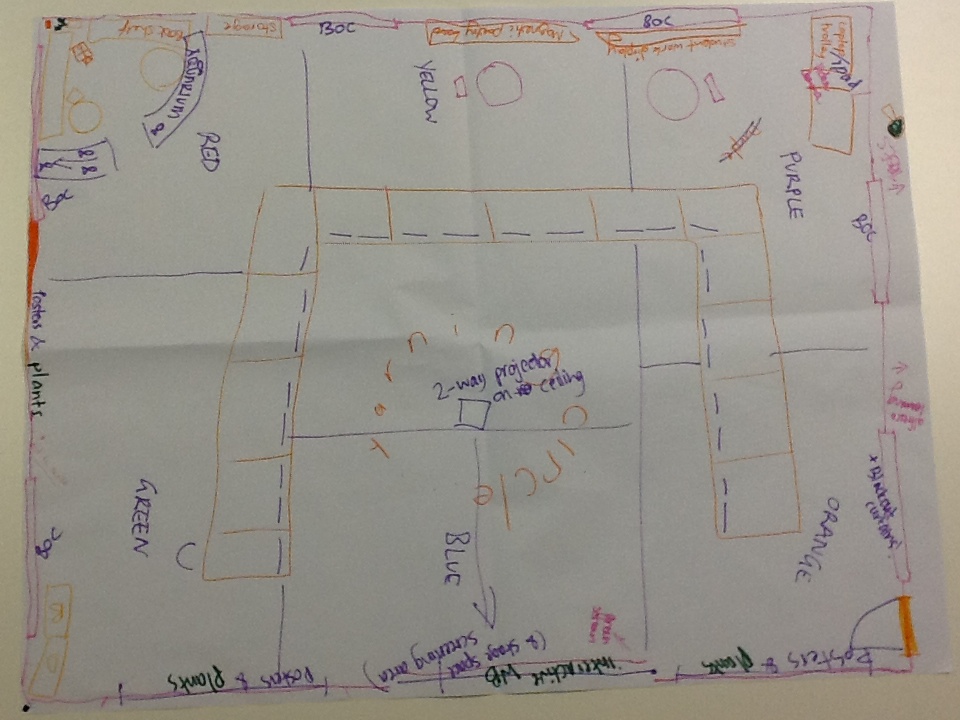
Multi-zone room with coloured carpets
Which PBL?
Posted in education, university on July 12, 2013
Today I attended a whole-day symposium on ‘learning and teaching in collaborative environments’, aka the LATICE program at QUT.
At the start of the day I was really excited to hear some of the speakers referring to the new learning rooms in the uni as ‘PBL rooms’. I had previously known these rooms as ‘collaborative work spaces’, or ‘CWS rooms’, but I was all too happy to change my terminology – how handy, I thought, to suggest PBL as a recommended pedagogy for such rooms!
Unfortunately, as the day went on it became clear that most people using the term PBL were referring to ‘problem based learning’, not to ‘project based learning’ (which is my preferred teaching style). I say unfortunately not because I have any beef with problem based learning – I think it’s great, in fact. But PROBLEM based learning is just one way to organise learning experiences.
And the ‘which PBL do you mean?’ problem doesn’t stop there:
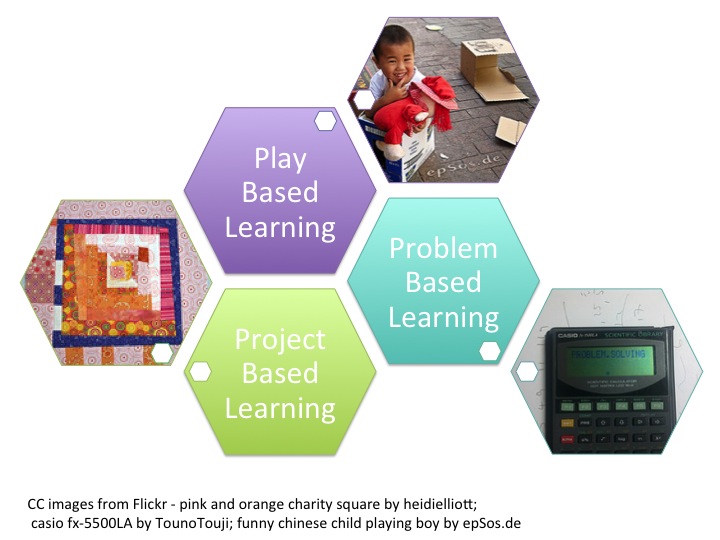
I have written a little before about the nature of ‘play based learning’, and think it’s important to draw on ALL of the above PBL models in a balanced teaching approach. I’m open to hearing how this may not be the case in other disciplines/faculties, but in the Education sector we certainly have to be across all three approaches.
The issue of nomenclature here is far from trivial. As frustrating as it is, I think we may need to complicate the cute ‘PBL’ acronym to enable practitioners to distinguish between the approaches. I could suggest:
- PmBL (problem based learning)
- PjBL (project based learning)
- PlBL (play based learning)
…fully realising that this just looks clumsy to some!
Any other suggestions for a way forward on this?
See, problem– and project– based learning differ importantly in the sense that a learning project should not have a pre-determined outcome, whereas a learning problem often does (imagine here a student working through a well-worn math problem). The difference between project– and play– based activities is also important, as learning projects do get assessed, whereas play is supposed to be low stakes and, well, playful.
One thing is for sure – we simply ought not go on giving presentations where we drop the ‘P’ term without qualifying which one we mean!
So…which PBL do you mean when you say PBL?
‘I’m a teacher and I just joined Twitter…now what?’
Posted in conferences, education, learning community, online tools, social media, technology, university on June 24, 2013
Last week I was walking a colleague through Twitter and thought now may be a good time to pen a post with some tips for new users. In particular I want to encourage new users in the education sector to build their profile on Twitter and explore its potential as a personal learning network.
I am a big fan of the microblogging service, using it for personal learning, professional sharing and even teaching. The things I like about Twitter the most are:
- I can check in any time and browse items that have been tweeted by people I have decided to follow
- It’s not full of banal updates about people’s personal life, as on Facebook
- If I don’t check it for ages I don’t get in trouble and there is no obligation to ‘catch up’ (unlike email)
- I have found the most amazing connections from around the world that I otherwise would not have – it is a real networking platform
In just a couple of weeks from now our Queensland English and literacy teaching associations are co-hosting our annual national conference. We have set up a Twitter handle (@EngLit2013) and declared a hashtag (#BNW13) for the event. With luck this medium will take off during the event and lots of teachers will experiment with using Twitter, perhaps for the first time.
This post, therefore, is written with school teachers and English/literacy educators in mind, as well as my colleagues at university.
If you have joined Twitter but still don’t really know what to do with it, this post is for you!
1. Hatch your egg
Many people I talk to feel nervous about writing their first tweet and following lots of people. So let’s not start there!
The first thing I like to get people doing with Twitter is making their profile page inviting to potential followers.
When you first create a profile on Twitter you will be given the default egg image as your picture. But you are not an egg! You aren’t even a chicken! You are a person!
It’s very important to update your profile picture, or ‘hatch you egg’, to show others that you are active online. By adding an avatar that better represents you, the service will also start to seem more interesting to you.

2. Add a bio
I rarely follow anyone who doesn’t have a bio, and many others have the same rule. Why? Not because I’m a Twitter-snob, but because without a bio it’s hard to tell who you freakin are!
Some people are reluctant to add a bio, worried that it will reveal too much about them, breach their privacy, or make them identifiable to their employer.
My tips for educators that are worried about such things are:
- Don’t feel pressured to name your workplace. Terms like ‘maths teacher’ or ‘science educator’ give us enough information to go on.
- Avoid declaring your religious or political affiliations, unless you are very comfortable doing so.
- Get in the habit of only saying things online that you would proudly stand by if your employer saw it.
- Don’t include your location if you have concerns about privacy or safety. You can always add this in later, once you are comfortable.
If in doubt, just browse a few other profiles until you get a feel for the kind of things people write. Many people are happy sharing that they are a husband, wife, parent of three, dog-lover etc. Writing such things is OK and entirely within the genre of a ‘professional’ bio. It’s all up to you and what you want to signal about yourself and your passions/priorities to others.
3. Follow about 15 people
I’ve heard a lot of recommendations about the ideal number of people to follow to get connections happening on Twitter. I suggest you will need to follow at least 50 people to see real ‘action’ on your feed…but following that many people is very overwhelming to most new users!
If you don’t follow enough people though, it will be difficult to see the point of Twitter.
So if you are a teacher trying to get the hang of microblogging I advise following about 15 other profiles straight away. This will give you enough material to read when you check Twitter that you are bound to find interesting things and start to see ‘the point’.
Here is a selection of profiles that I often recommend to English teachers new to Twitter:
- @edutopia (kick-ass education resources)
- @heyjudeonline (teacher-librarian)
- @BiancaH80 (English teacher)
- @Darcy1968 (Deputy Principal)
- @englishteachers (AATE – professional association)
If you are happy to follow celebrities there is also @MargaretAtwood, @stephenfry and @rickygervais. Sometimes they tweet A LOT though, so if that gets too intense, always feel free to UNFOLLOW people – we don’t take it personally on Twitter!
4. Write a tweet!
This is actually the easiest part.
You can choose to say something, ask a question, or share a link with others.
What you must keep in mind though is that Twitter is NOT Facebook. There are no ‘likes’ (though tweets can be re-tweeted or added to a favourites list) and many times you will say things that get no reply or comment. Not single one. Don’t be sad about this!
Be confident in the knowledge that people may be reading your tweets, but not replying. You will do this to them too – it’s OK.
Also be confident that even if no-one notices your tweet, that what you wrote was still worth saying. You might even come back to your own tweets every now and then to rediscover links or information you have shared. Your Twitter feed is as much for you as it is for others.
If you want lots of people to see your tweet you can include what is called a hashtag in your post – popular ones include #edchat and #edtech. There are also subject-specific hashtags, such as the #ozengchat tag for Australian English teachers to use for chatting.
5. That’s enough for now…go and get a coffee 🙂
Once you’ve added a profile picture and a bio, followed some people and posted a tweet, you are well on your way to being an effective microblogger.
Tweeting directly to people by including their handle (e.g. @kmcg2375) in your post and including hashtags can increase the number of replies you get, but you will find this out as you go.
One final thought for those of you who are wary of joining ‘yet another’ social media service…not all social networks are the same.
Give Twitter a decent try, checking in at least once a week for a month, you’ll see what I mean 🙂
xo

Ingress
Posted in personal, random, social media, technology, video games on June 10, 2013

Resistance is never futile.
There is a new game in town, and it’s called Ingress.
It’s an Augmented Reality Game (ARG) and it’s only available for Android – you get it from the Google Play store. But before you can play, you have to request an invite.
Once you have an invite, it is very important that you join the RESISTANCE team. Because that is the team I am on. And it is the best team. (You might think that I would go with the Enlightened, but oh no…I’ve seen the Terminator series. I know about Skynet.)
Click here for more information about factions in the game.
If you want to get an invite faster, you can join the Google+ community for Ingress and submit an artwork or other offering. Because the game is made by Google, this strategy actually does get your invite to come faster! Here is one of the art offerings I made to get my invite – a digital collage made using Polyvore:

Ingress invitation to play
After playing this game for a few months I am now up to level 6 and fairly active in protecting the portals in my university precinct. It’s been a great game for learning about where historic landmarks and public art is in Brisbane, as well as for getting a lot of exercise walking around the city to find portals!
Review of Ingress: November 2012, Android Police
If anyone in Brisbane starts playing, let me know!
Ditto friends in Sydney – we can go for an Ingress run next time I’m down south 🙂
BUT ONLY IF YOU JOIN THE RESISTANCE!
Spoken Word Poem: Mathematics
Posted in english, online tools, social media, technology on June 7, 2013
I love this spoken word poem by Hollie McNish!
Uploaded in February this year, a colleague shared it with me today. It has been viewed over 665,000 times.
As well as being a stand out piece of speech, this poem would be useful for English teachers looking for texts to explore issues of immigration and racism (arguably with links to ‘numeracy’ capabilities as well!)
Press Play. Sit Back. Enjoy:
Where I was: The 2013 MILID meeting in Cairo
Posted in conferences, education, learning community, university on June 1, 2013
I’ve been back from overseas now for a few weeks and have almost (almost) accomplished the Great Assignment Marking Catchup. We’re all faced with one from time to time, but for me having a trip overseas is still always worth it!
Part of my overseas stay was, amazingly, in Cairo. I had never been to Egypt before, or anywhere in the Arab region. Most of my time was spent at the MILID Week meetings at Cairo University, which was the event I was there to be part of.

Cairo University, Egypt
What is MILID?
MILID stands for ‘Media and Information Literacy and Intercultural Dialogue‘. UNESCO, together with the United Nations Alliance of Civilisations (UNAOC) have created a UNITWIN Cooperation Program and Global Chair on ‘MILID’, to focus resources and efforts across partner universities from around the globe on Media and Information Literacy.
To give you an idea of what the group does, here are two of the seven objectives of the MILID network:
- Act as a Observatory for critically analyzing: the role of Media and Information Literacy (“MIL”) as a catalyst for civic participation, democracy and development; for the promotion of free, independent and pluralistic media; as well as MIL’s contribution to the prevention and resolution of conflicts and intercultural tensions and polarizations.
- Enhance intercultural and cooperative research on MIL and the exchanges between universities and mass media, encouraging MIL’s initiatives towards respecting human rights and dignity and cultural diversity. (http://www.unaoc.org/communities/academia/unesco-unaoc-milid/)
How did I get involved?
Across the globe there are eight universities involved as Chairs in the MILID program. My institution, Queensland University of Technology, is the Chair from Australia. Other countries represented are: Spain (Autonomous University of Barcelona), Egypt (Cairo University), China (Tsinghau University), USA (Temple University), Brazil (University of Sao Paulo), Jamaica (University of the West Indies), Morocco (Mohamed Ben Abdellah University).
This semester QUT has run a pilot course in Media and Information Literacy and Intercultural Dialogue, using the UNESCO Curriculum for MIL. Along with Michael Dezuanni and Hilary Hughes, I’ve been teaching the course to students online, for free, from over 70 countries.

Most of the MILID Global Chairs
MILID Week
MILID WEEK is a space to promote contact and cooperation between international organizations, associations, NGOs, universities, media, research groups, researchers, teachers, and students from around the world working in media literacy and information and intercultural dialogue. (http://milidweek2013.blogspot.com.es/p/presentation.html)
This year Cairo University was the host of MILID week, which ran from 22-25 April. Last year the week was hosted in Barcelona, Spain; next year the week will be hosted in Beijing, China.
What I liked best about my first MILID week was the opportunity it provided to speak in depth with colleagues in this specialised field. Over the days of debates and presentations we shared information about how media is being used (and subverted) in our countries and regions, as well as the politics of information literacy in schools and communities. This event gave us space to find common interests and develop shared strategies for promoting the concept of MIL.
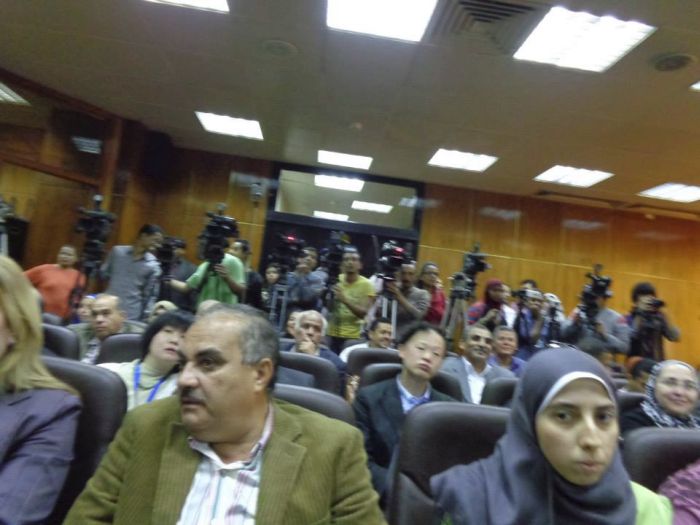
MILID week media pack and audience
What did I learn?
It was eye opening to consider such questions during the MILID week as: How can we plan collaboration via social media in a group that includes members from China? How can we share media texts across national boundaries to promote intercultural dialogue? How can media and information literacy support social justice initiatives?
Mostly I was interested to learn about how other universities worked and how much attention is given to media literacy and/or information literacy in different places. I came away with the impression that Australia is relatively well-placed in terms of access to traditional and new media, connection to the internet, and use of social media. But I wonder whether Australian students are exposed to practices of citizen journalism as much as they might be? It struck me that in a place like Egypt, citizens currently have a lot of motivation to produce their own stories and information…by contrast the culture of media consumption in Australia seemed complacent to me.
And, as always when spending time with folks from a range of countries, I was reminded of how monolingual my world is. I speak next to no words in other languages; most of the people around me from Anglophone countries were in the same boat.
If I can’t go in person to the MILID Week in China next year I’ll be disappointed now, as I feel like I only just got to know this group and my place in it! However with the week falling in April/May, right in the middle of semester 1 in most Australian universities, I can’t say I will be able to take this kind of a break away from classes again for awhile. Either way, I’ll be continuing to promote the new MILID journal and contribute online to the Clearinghouse.
Soon the MIL Curriculum will be available via an interactive module-based website, to complement the existing PDF of the Curriculum. I’ll be sure to post again with details once the site is launched!
Thanks to QUT Faculty of Education and UNESCO for supporting this travel and development opportunity.
Using social media to support FYE
Posted in education, learning community, online tools, social media, technology, university on March 19, 2013
Ah, “FYE” … the new acronym in my life!
It stands for First Year Experience, and now that I’m the FYE Coordinator for my Faculty, it’s something I’ve been thinking about a lot.
As a school teacher, the role reminds me a LOT of being a Year Advisor, but with one difference. Instead of staying with my year group and looking after them until they graduate, at the end of the year I send my group off to second year, and prepare to look after the FYE of a new cohort.
My FYE jobs
This is my first year in the role, and one of my ‘big jobs’ is to consult with unit coordinators to identify students in need of help with academic literacy. Students have a raft of assignments due around weeks 4-6 and using those we can make early recommendations for study skill support.
I’m also one of the main points of contact for first year students, and I get to go to many (very interesting, seriously) meetings about student engagement and improving campus life. My personal engagement project is a knitting club that I am launching for Education students in Week 5 of semester 🙂
Enter Twitter
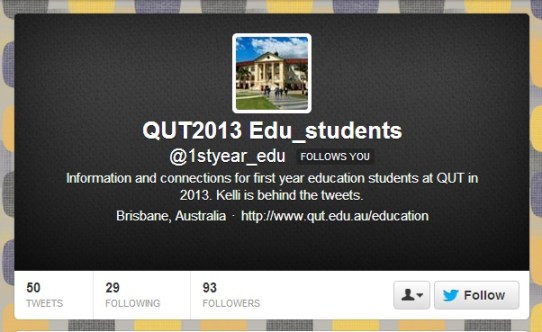
Something else I am trying this year is the establishment of a Twitter account (1styear_edu) to communicate messages relevant to students in first year Education. I’ve stated nice and clearly in the bio that I am behind the tweets, and the profile pic is a shot of our lovely main admin building at Kelvin Grove campus. I’m not following students back (yet), but am following things that I think they would like, or that I would want to retweet from.
So far I’m up to 93 followers, out of a potential 650 (ish). It’s Monday of week 4, out of 13 week semester, and on the whole, I am happy!
Yes, yes, some things I already know:
- Almost all first year students use Facebook, with only about 10% entering our courses using Twitter. We know this from a student survey. I think this is great, because it means most of them are up to date with the digital literacy skill needed to use Twitter, and just need some guidance to transfer those practices.
- Not many students like Twitter when they first join it. I know this anecdotally, but I don’t see this as a reason not to persist with the service. In fact, I think it’s good to put students out of their learning ‘comfort zone’ … especially students that are trying to become teachers!
- Most students won’t go to Twitter regularly for announcements. That’s OK! They should be going to the institution’s ‘Blackboard’ (or other LMS) for essential announcements. Although I do repeat some key announcements on Twitter, it would be inequitable to announce important stuff there without also placing it on Blackboard. Twitter is for engagement, tips, and social study support.
- Students don’t use their social media for learning. Well, I know that some already do, actually – you should meet them! But I sincerely hope that by the time the others graduate from a year (or four) at QUT that their attitude to Personal Learning Environments will have changed! Using Twitter is just one thing I can do to help them over this threshold.
What is to come?
I hope that students will increase their take-up of Twitter for crowdsourced note taking. I’ve attempted to lead some tweeting using the unit codes #EDB006 (for ‘Learning Networks’, the only core unit that first year students share) and #CLB320 (a unit on ‘Studies in Language’ that about half the cohort undertakes).
I also want to show other teachers the power of using tools such as Storify to collect tweets about a topic that can be used later as a teaching aid. For example, here is my collection of tweets from the start of EDB006:
http://storify.com/kmcg2375/edb006-tweets-and-media-weeks-1-and-2
Other than that, I think I’m just hoping for some more discussion between students … but I don’t mind if that doesn’t really kick in until later in their degrees. For now I’m just stoked to have seen any interaction at all!
93 followers, baby … how long will it take me to double it? I’ll be sure to report back when we hit 186 😉
Nominated!

- Australian English Teachers
 9 members
A group for English teachers in Australia to discuss the books they are reading, and the books th...
Books we've read
View this group on Goodreads »
Share book reviews and ratings with Australian English Teachers, and even join a book club on Goodreads.
 Kelli McGraw
Recent Comments